>
> Greetings,
>
> I have an ooPIC-R that I am planning to use to control an audio
> installation. The ooPIC will be used to drive a Daisy MP3 player
(kit
> from Make magazine). I am familiar with RS232C types of serial
> connections, but this type of serial IO is new to me. The Daisy
has a
> serial control interface with TX and RX pins. I will be providing
> power to the Daisy using one of the regulated connections on the
ooPIC.
>
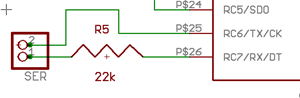
> This is the diagram of the serial pins on the target device.
> <http://tangentview.com/images/schem.png>
>
> My question is how do I wire these two boards together. The
grounds
> should be linked by the power configuration, but how many other
wires
> are needed? Which ooPIC objects should I be using? I am just not
sure
> about timing and flow control.
>
> thanks
>
> -Ray
From the schematic, the device doesn't offer flow control. If the
OOPic has to RECEIVE information from the device and the messages are
more than about 4 chars at almost any slow baud rate, this project
ain't happening. We've been talking about this almost continuously
for the last two weeks.
Unfortunately, the OOPic R has an RS232 level shifter built in.
Also, unfortunately, it isn't real RS232. Probably the easiest thing
to do is shift the levels of your device and plug it into the OOPic
DB-9 connector. Use a level shifter like
http://www.pololu.com/catalog/product/126
Connect the device Rx line
to the level shifter Tx and vice versa. You can ignore the other
signals but you do need to provide power and common ground.
Now, since the OOPic has a female connector and the level shifter
also has a female connector, you need a male-by-male null modem to
make the connection. See http://www.cablesforless.com/index.asp?
PageAction=VIEWCATS&Category=428 Use oSerialPort
If the OOPic really doesn't need to receive anything, you can use
oSerialL and just connect the OOPic output pin (pick one) to the
device Rx line.
Richard
Yahoo! Groups Links
<*> To visit your group on the web, go to:
http://groups.yahoo.com/group/oopic/
<*> Your email settings:
Individual Email | Traditional
<*> To change settings online go to:
http://groups.yahoo.com/group/oopic/join
(Yahoo! ID required)
<*> To change settings via email:
mailto:oopic-digest@yahoogroups.com
mailto:oopic-fullfeatured@yahoogroups.com
<*> To unsubscribe from this group, send an email to:
oopic-unsubscribe@yahoogroups.com
<*> Your use of Yahoo! Groups is subject to:

No comments:
Post a Comment